
Google just dropped something that a lot of us in the SEO world have been waiting on for a while. If you've been wondering how your pages actually show up inside AI Overviews and AI Mode, there's finally a way to peek behind the curtain. It's called the Google Search Console AI performance reports, and honestly, it's a big deal for anyone who cares about staying visible as search keeps changing.
I'll walk you through what these reports are, how to read them, and a few tips to make the most of them.
What Are the New AI Performance Reports?
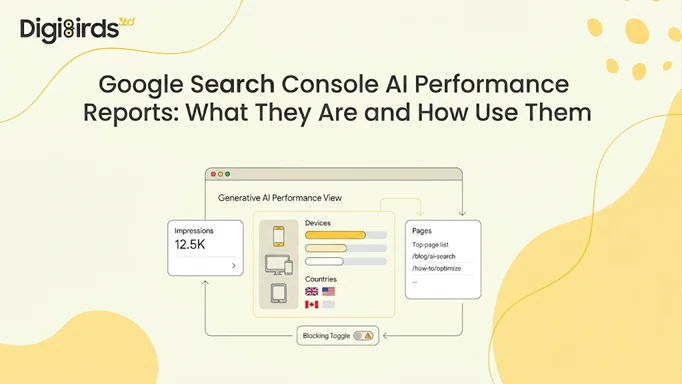
Google rolled out new Search Generative AI performance reports inside Search Console to help you understand your site's visibility within generative AI features on Search. That means AI Overviews, AI Mode, and even generative AI stuff in Discover now get their own dedicated view.
Before this, all that data was just kind of mashed in with your regular search numbers. You couldn't really tell what came from a normal blue link versus what came from an AI answer. Now you can separate it out, which makes a huge difference when you're trying to figure out what's working.
One thing worth knowing right away: this is the whole point of "Introducing Search Generative AI performance reports in Search Console," which is the title Google used for its own announcement. It's still early days, though. Google is rolling these reports out to a subset of websites first so they can test and tweak before everyone gets it. Right now it's mostly UK site owners, and it'll spread out from there.
What Data Do You Actually Get?
Alright, let's talk numbers. The report gives you a handful of metrics, and they're pretty straightforward.
You'll see impressions, which is basically how often URLs from your site appeared in generative AI features in Search and Discover. Then there are pages, so you can check which specific URLs are popping up in AI answers. You also get countries to understand where your visibility is coming from, devices to see what people are using when they spot your site, and dates so you can track changes over time with hourly, daily, weekly, or monthly views.
Now here's the catch, and it's a real one. There's no click data in this report. Google isn't telling us how many people actually clicked through from an AI answer to a site. When asked about it, a Google spokesperson basically said they're continuing to work with website owners to understand what insights will be most helpful and may add more metrics later. So for now, impressions are what you've got to work with.
How to Access and Use the AI Performance Reports?
If you've got access, getting to these reports is simple. Log into your Search Console account and head over to the Performance section. From there, you'll find the generative AI view sitting separately from your usual search results data.
Here's a basic way to start using it:
Step 1: Open the AI performance view and look at your impressions over the last 28 days or so. This gives you a feel for whether AI features are even showing your content yet.
Step 2: Switch to the Pages dimension. This is the gold here. It tells you exactly which of your URLs are being pulled into AI answers, so you know what content Google's AI actually trusts.
Step 3: Check the Countries tab if you serve different regions. You might be surprised which markets are picking up your pages in AI responses.
And that's pretty much it. It's not complicated; it's just new. Spend a bit of time poking around, and it starts to make sense fast.
Other Big News: “Blocking Your Content From AI”
There's a second piece to this that's just as interesting. Google is also testing a new toggle within Search Console to allow sites to block their content from showing in AI search features like AI Overviews and AI Mode.
But read this part carefully. Google says sites that opt out will not receive traffic or impressions from our generative AI features. So it's a trade-off. The good news is that this control will not be used as a ranking signal for search results outside of these generative AI search features, meaning it shouldn't hurt your normal web rankings. Still, I'd think long and hard before flipping that switch.
Quick Tips to Get Ahead
A few things I'd keep in mind as these reports roll out.
Don't panic if you don't have access yet. It's coming, just not everywhere at once. Keep checking your account.
Use the Pages data to spot your "AI-friendly" content and create more like it. If Google's AI keeps citing certain pages, that's a pattern worth copying.
And remember, impressions aren't clicks. Visibility in AI doesn't always mean traffic, so keep an eye on your overall site numbers too, not just this one report.
At last, the Google Search Console AI performance reports are a solid first step toward understanding how your content lives inside AI search. It's not perfect, and the missing click data is annoying, but it's miles better than flying blind. As AI keeps reshaping how people find stuff online, this kind of data is going to matter more and more.
If you want help making sense of your AI search performance or building content that actually gets picked up by Google's AI, come check out DigiBirds360. We'd love to help you stay ahead of the curve.